

Home Blog Page 102

Ayushman Bharat Registration

How to apply Online Ayushman Bharat Yojana health Card PMJAY 2021

नमस्ते दोस्तों आज के इस post में हम Ayushman Bharat Yojana health Card की जानकारी आपके साथ साझा करेंगे तो अगर आप भी Ayushman Bharat Yojana health Card बनवाना चाहते है तो हमारे साथ बने रहे.

Ayushman Bharat Yojana health Card क्या है?

Ayushman Bharat Yojana हमारे देश के प्रधानमंत्री द्वारा चलाए जाने वाला एक health योजना है. जिसके अंतर्गत सरकार का लक्ष्य था कि सभी लोगो का अच्छे से इलाज हो सके इसके लिए health योजना को लौन्च किया था. इस योजना के अंतरगत सरकार शरुआत में 50 करोड़ लोगो को यह शुबिधा देना चाहती है जोकि इस देश की आधी आवादी है. इस योजना के अंतर्गत जिस परिवार को सम्लित किया जाता है उस परिवार को सालाना 5 लाख दिया जाता है. जिसे वह अपने इलाज में उपयोग कर सकते है. अगर कोई परिवार 1 साल के अंदर उस धन रासी को खर्च कर देती है. उस परिवार को उसी कार्ड पर अगले साल भी 5 लाख दिए जाते है, इसलिए यह योजना काफी beneficial हो रही है. और काफ़ी लोग इस योजना का benefit ले रही है.

https://mera.pmjay.gov.in/search/login

यह योजना अब और भी beneficial होगी है क्योंकि इस योजना के अंतर्गत वर्तमान समय में सरकारी hospital के साथ Private hospital को काफी मात्र में जोड़ दिया गया है. जिसके अंतरगत आप Private hospital में अपना treatment करा सकते है. यही नही इस योजना के अंतर्गत आप फ्री में covid-19 test भी करवा सकते है. इस योजना के अंतर्गत आप सभी treatment का पेमेंट इस कार्ड से कर सकते है. जैसेकि डोक्टर की फीस दवाइयों का खर्च और अगर आपको किसी तरह के operation की जरुरत है तो आप इस योजना के अंतरगत करवा सकते है यह तक अगर आपको किसी तरह treatment के लिए एक राज्य से दुसरे राज्य जाते है तो उसका भी खर्च आप इस कार्ड में जुड़वाँ सकते है.

https://pmjay.gov.in/

यह तो होगी इस योजना के benefit अब जान लेते है, कि आप इस योजना में आवेदन कैसे कर सकते है. अगर आप इस योजना के अंतर्गत आप यह कार्ड बनवाना चाहते है तो आप यह कार्ड कैसे बनवा सकते है. योजना कार्ड बनवाने के लिए वर्तमान में अभी इस योजना में सामाजिक आर्थिक जाति janganana 2011 के आधार पर लाभ दिया जा रहा है. सरकार ने इसकी सूचि पहले ही तयार कर दी है. जिसमे करीब 50 करोड़ लोगो  नाम सम्लित है. जिसमे देश कि आधी जनसंख्या आती है. लेकिन वर्तमान में अभी इस योजना के अंतरगत अभी श्रीफ 12 करोड़ लोगो ने यह कार्ड बना रखा है.  वर्तमान में नए लोग भी अपना कार्ड बनवा सकते है.

ayushman bharat yojana registration online | ayushman bharat states list |ayushman bharat scheme details | ayushman bharat registration online

health Card कैसे बनवाए? 

health Card बनवाने के लिए पहले आपको गूगल पर सर्च करना है. pmjay.gov.in

जैसे ही आप गूगल पर pmjay.gov.in सर्च करेंगे तो आपके सामने  वेबसाइट ओपन होगा जिसका interface कुछ ऐसा होगा.

अब आप am i eligible पर click कर दे.

click करते ही आपके सामने एक नया page ओपन होगा जिसमे आपको अपना मोबाइल नंबर को डालना है और जो कैप्चा दिया गया है उसे भरना है. कैप्च भरने के बाद आपको generate top पर click कर देना है.

जैसे ही आप generate top पर click करेंगे तो आपके सामने यह page ओपन होगा जिसमे आपको otp भरना है जो आपके मोबाइल नंबर पर भेजा गया है. और फिर आपको सबमिट बटन पर click कर देना है.

इस page में आपको पहले अपना राज्य सेलेक्ट कर लेना है.

अब आपको Category पर click करना है जैसे ही आप Category पर click करेंगे तो आपको पाच आप्शन मिलते है. लिस्ट में आपना नाम चैक करने के लिए गर आप अपने नाम से लिस्ट में चैक करना चाहते है तो उसके लिए आपको पहले आप्शन पर click करना है.

अब आपके सामने एक नया page ओपन होगा जिसमे आपको अपना नाम भरना होगा. नाम डालने के बाद आपको मेल और फीमेल को सेलेक्ट करना है. फिर जिला और गाव का नाम डाल देना है. जिसके बाद आपको सर्च पर click कर देना है. आपको इस page में सभी जानकारी को भरने की जरुरत नही है.

जैसे ही आप सर्च पर click करेंगे तो आपके सामने उस नाम से जितने भी नाम लिस्ट में होंगे वह सभी आपको दिख जायेगे. आपको उस नाम के details को देखने के लिए उस नाम पर click कर दे.

आप यहा अपना सारा details को देख सकते है. इस page में आपको आपने परिवार के मेम्बर का नाम भी दिखा जायेगा. आपको इस page में से HHD NO को नोट कर लेना है. और आपको अपने नजदीकी CSC centre जाना है जहा आपका Aadhaar verification किया जायेगा जिसके बाद आपका Ayushman Bharat Yojana health Card बन जायेगा. 

health id card apply

ayushman bharat hospital list | ayushman bharat eligibility | ayushman bharat upsc | ayushman bharat website

दोस्तों अगर आपको हमारी यह जानकारी आपको अच्छी लगी होतो आप हमारे इस post को अपने दोस्तों के साथ शेयर करे जिससे आपके दोस्तों की भी सहायता हो सकते. आप सभी का इस post को पढने के लिए धन्यवाद आपका दिन शुभ रहे.


How to get a food license – fssai license registration foodlicensing.fssai.gov.in

Fasai License Registration – food license kaise banaye | fssai registration process in hindi

Hello friends, all of you are welcome in this post of ours, in today’s post we will learn how to make food license from your mobile. So let’s learn.

What is food license?

fssai license: Food Safety and Standards Authority of India If you start any food business like food stall, hotel, dhaba, restauran etc. then you have to get food license from fssai. From which it is based, that it meets their requirements. That’s why before you start any food business, you have to have a food license. Which you can make online from your home.

What is the full form of fssai?

The full form of fssai is :- Food Safety and Standards Authority of India

How to get food license?

To create a food license, you have to come to foodlicensing.fssai.gov.in

After coming to this website, you have to click on Sign Up.

After this you have to fill all the information in this page. And fill the captcha. And click on Register.

Now you will see the message of Account Successfully Created in front of you.

Now you have to open your own gmail account, which gmail you had entered before registering in that form. As soon as you open that mail, then some such mail will come in front of you in which you will get your username. Which you have to copy and come to the home page.

After coming to the home page, you have to fill the user id. And you have to enter your password, which was created while registering. And login by filling the captcha.

After login you will come to its dashboard. Now you have to click on Apply for License Registration.

After clicking, you have to click on Accept.

Now select your state. In whichever state you want to start your business.

In this page, you have to tell that if your business is not in any other state under the name of Sam, then if not click on yas then click on no.

Now you have to select the business category, now you have to click on other businesses. And select your category.

Now click on Click to Apply.

Now this form will open in front of you, which you have to fill, such as your busines name, your address and mobile number, email id etc. have to be filled.

foodlicensing.fssai.gov.in

After filling all the information, you have to upload one of your documents. And you have been given a link to a form below which you have to download and print it. You can download this form in Hindi or in English.

After printing this form, you have to fill it. In this form, you have to get the date place and your signature and write your name below. After which you have to scan this form.

And here you have to upload it.

Now you have to fill the information asked below. And click on save.

Now you have to download the form a which you just filled.

After printing this form, you have to scan this form by placing the date below and your signature.

Now upload the form.

Now you click on the submit button.

Now you have to pay for it. Which will be 100 rupees, which you can also do online. If you want to make its payment offline, then you have to submit your form in its office. Therefore, you should select the option of online payment only.

As soon as you make the payment, it will bring you to the home page where you will get to see your application number. Which you have to download.

Now you can also check your status by application number. As soon as your application is approved, after that you can download it and use it.

So friends, in this post, we taught you how you can make food license sitting at home, if you like this information of ours, then share this post with your friends. Thank you for reading this post. Have a nice day.

How to Apply for Driving License Online-driving licence online

foodlicensing.fssai.gov.in

paytm soundbox return

नमस्ते दोस्तों आप सभी का हमारे इस पोस्ट में स्वगत है. आज के इस पोस्ट में हम सीखेंगे की आप कैसे Paytm Soundbox को return कर सकते है.

Paytm Soundbox क्या है?

1. Paytm Soundbox एक ऐसा उपकरण है जो आपको Paytm या किसी अन्य भीम UPI ऐप के माध्यम से प्राप्त होने वाले प्रत्येक भुगतान पर आपकी पसंदीदा भाषा में तत्काल ऑडियो या वॉयस नोटिफिकेशन पुष्टिकरण प्राप्त करने में मदद करता है। यह आपके दैनिक भुगतान अलर्ट के लिए एक छोटा और पोर्टेबल स्पीकर है।
2. तत्काल और परेशानी मुक्त स्थापना के साथ इस Paytm Soundbox की उच्च गति वितरण प्राप्त करें
3. एकमुश्त सेट अप शुल्क 299 रुपये लिया जाएगा।
4. डिवाइस की डिलीवरी के बाद, हर महीने की पहली तारीख को मासिक डेटा और नेटवर्क शुल्क 125 रुपये काटा जाएगा
5. उपर्युक्त राशियों में जीएसटी शामिल है
6. डिवाइस 12 महीने की अवधि के लिए प्रतिस्थापन वारंटी के अंतर्गत आता है

Paytm Soundbox Plan Details

  1. उपयोगकर्ता रुपये का भुगतान करेगा। डिवाइस की खरीद पर 299
  2. डिवाइस की डिलीवरी के बाद, हर महीने की पहली तारीख को सेटलमेंट राशि से 125 रुपये का मासिक शुल्क काट लिया जाएगा।
  3. उपरोक्त उल्लिखित राशियाँ GST सहित हैं
  4. यदि आप सेवा को बंद करना चुनते हैं, तो आपको इस अनुरोध के साथ आगे बढ़ने के लिए 250 रुपये का निष्क्रिय शुल्क देना होगा।
  5. सफल निष्क्रियता के बाद कोई और नेटवर्क या डेटा शुल्क नहीं काटा जाएगा
  6. डिवाइस खरीद की तारीख से 12 महीने की अवधि के लिए प्रतिस्थापन वारंटी के तहत कवर किया गया है।
  7. इस उत्पाद को खरीदकर, आप पुष्टि करते हैं कि आप One97 Communications Ltd. के मर्चेंट हैं और आपने One97 के साथ मर्चेंट ऑनबोर्डिंग प्रक्रिया पूरी कर ली है।

Paytm Soundbox बंद कैसे करे?

दोस्तों अगर अपने शॉप पर Paytm Soundbox लगवाया हुआ है. और अब आप उस Paytm Soundbox को हटवाना चाहते है. तो आप उस Paytm Soundbox को है. हटवा सकते है. जैसे की आप सभी को पता ही होगा. की आप Paytm Soundbox का उपयोग करे या फिर न करे फिर भी आपको हर महीने 125/- रुपये का भुगतान करना पड़ता है. ऐसे में आप इस 125/- रुपए के भुगतान से बचना चाहते है तो उसके लिए आपको Paytm Soundbox device को deactivate करना पड़ता है. पर आप यह कैसे करेंगे.

दोस्तों आपको device को deactivate करने के लिए सबसे पहले Business App, or call our 24X7 Helpdesk at 0120-4440440 नंबर पर काल करना होगा. जैसे ही Helpdesk पर कॉल करेंगे तो आपकी बात customer executive से बात होगी. जिसमे आपको अपने शॉप लगाए गए. Paytm Soundbox device को deactivate करने का request करना है. जिसके बाद customer executive आपका Paytm Soundbox device को deactivate करने का request डाल देगा. जैसे ही आपका request सबमिट होगा. उसके बाद 24 से 48 घंटो में आपके पास Paytm business merchant agent आपके शॉप पर आएगा. और आपसे आपका Paytm Soundbox लेलेगा. आपको Paytm Soundbox के साथ जितने भी चीजे मिली थी आपको वह सभी चीज़े दे देना है. जैसे ही आप Paytm business merchant agent को Soundbox return कर देंगे तो आपके पास Paytm business की तरफ से एक message आ जाएगा.

नोट: दोस्तों आप जब अपने Paytm Soundbox device को deactivate करते है. तो आपके Paytm business अकाउंट में से कुछ पैसे काटते है.

दोस्तों अगर आपको हमारे इस पोस्ट की जानकारी आच्छी लगी होतो हमारे इस पोस्ट को अपने दोस्तों के साथ शेयर करे. दोस्तों आप सभी का हमारे इस पोस्ट को पढने के लिए धन्यवाद. आपका और आपके परिवार का दिन शुभ रहे.

Paytm Soundbox को return कैसे करे?

नमस्ते दोस्तों आप सभी का हमारे इस पोस्ट में स्वगत है. आज के इस पोस्ट में हम सीखेंगे की आप कैसे Paytm Soundbox को return कर सकते है.

Paytm Soundbox क्या है?

1. Paytm Soundbox एक ऐसा उपकरण है जो आपको Paytm या किसी अन्य भीम UPI ऐप के माध्यम से प्राप्त होने वाले प्रत्येक भुगतान पर आपकी पसंदीदा भाषा में तत्काल ऑडियो या वॉयस नोटिफिकेशन पुष्टिकरण प्राप्त करने में मदद करता है। यह आपके दैनिक भुगतान अलर्ट के लिए एक छोटा और पोर्टेबल स्पीकर है।
2. तत्काल और परेशानी मुक्त स्थापना के साथ इस Paytm Soundbox की उच्च गति वितरण प्राप्त करें
3. एकमुश्त सेट अप शुल्क 299 रुपये लिया जाएगा।
4. डिवाइस की डिलीवरी के बाद, हर महीने की पहली तारीख को मासिक डेटा और नेटवर्क शुल्क 125 रुपये काटा जाएगा
5. उपर्युक्त राशियों में जीएसटी शामिल है
6. डिवाइस 12 महीने की अवधि के लिए प्रतिस्थापन वारंटी के अंतर्गत आता है

Paytm Soundbox Plan Details

  1. उपयोगकर्ता रुपये का भुगतान करेगा। डिवाइस की खरीद पर 299
  2. डिवाइस की डिलीवरी के बाद, हर महीने की पहली तारीख को सेटलमेंट राशि से 125 रुपये का मासिक शुल्क काट लिया जाएगा।
  3. उपरोक्त उल्लिखित राशियाँ GST सहित हैं
  4. यदि आप सेवा को बंद करना चुनते हैं, तो आपको इस अनुरोध के साथ आगे बढ़ने के लिए 250 रुपये का निष्क्रिय शुल्क देना होगा।
  5. सफल निष्क्रियता के बाद कोई और नेटवर्क या डेटा शुल्क नहीं काटा जाएगा
  6. डिवाइस खरीद की तारीख से 12 महीने की अवधि के लिए प्रतिस्थापन वारंटी के तहत कवर किया गया है।
  7. इस उत्पाद को खरीदकर, आप पुष्टि करते हैं कि आप One97 Communications Ltd. के मर्चेंट हैं और आपने One97 के साथ मर्चेंट ऑनबोर्डिंग प्रक्रिया पूरी कर ली है।

Paytm Soundbox बंद कैसे करे?

दोस्तों अगर अपने शॉप पर Paytm Soundbox लगवाया हुआ है. और अब आप उस Paytm Soundbox को हटवाना चाहते है. तो आप उस Paytm Soundbox को है. हटवा सकते है. जैसे की आप सभी को पता ही होगा. की आप Paytm Soundbox का उपयोग करे या फिर न करे फिर भी आपको हर महीने 125/- रुपये का भुगतान करना पड़ता है. ऐसे में आप इस 125/- रुपए के भुगतान से बचना चाहते है तो उसके लिए आपको Paytm Soundbox device को deactivate करना पड़ता है. पर आप यह कैसे करेंगे.

दोस्तों आपको device को deactivate करने के लिए सबसे पहले Business App, or call our 24X7 Helpdesk at 0120-4440440 नंबर पर काल करना होगा. जैसे ही Helpdesk पर कॉल करेंगे तो आपकी बात customer executive से बात होगी. जिसमे आपको अपने शॉप लगाए गए. Paytm Soundbox device को deactivate करने का request करना है. जिसके बाद customer executive आपका Paytm Soundbox device को deactivate करने का request डाल देगा. जैसे ही आपका request सबमिट होगा. उसके बाद 24 से 48 घंटो में आपके पास Paytm business merchant agent आपके शॉप पर आएगा. और आपसे आपका Paytm Soundbox लेलेगा. आपको Paytm Soundbox के साथ जितने भी चीजे मिली थी आपको वह सभी चीज़े दे देना है. जैसे ही आप Paytm business merchant agent को Soundbox return कर देंगे तो आपके पास Paytm business की तरफ से एक message आ जाएगा.

नोट: दोस्तों आप जब अपने Paytm Soundbox device को deactivate करते है. तो आपके Paytm business अकाउंट में से कुछ पैसे काटते है.

दोस्तों अगर आपको हमारे इस पोस्ट की जानकारी आच्छी लगी होतो हमारे इस पोस्ट को अपने दोस्तों के साथ शेयर करे. दोस्तों आप सभी का हमारे इस पोस्ट को पढने के लिए धन्यवाद. आपका और आपके परिवार का दिन शुभ रहे.

how to make plastic aadhar card – pvc aadhar card

How To Make Plastic Aadhar Card – PVC Aadhar Card | pvc aadhar card online order | uidai pvc aadhar

Hello friends, all of you are welcome in this post of ours. In today’s post, we will learn how you can convert your aadhar card to pvc aadhar card. So let’s know how you can get your pvc aadhar card made.

How to make Plastic Aadhar Card?

A new update has just come in the Aadhar card, under which you can get your Aadhar card in Pvc card from the website of Aadhar card. Earlier the Aadhar card given to you was a soft paper. Due to which if your Aadhar card was ever damaged, it would get damaged. And you had to print a new Aadhar card. Some people got upset about this and got their aadhar card printed on pvc card from the shop. In which your Secure OR Code was there. He used to get spoiled. And that card was not recognized for use by uidai.

Pvc card

Now in view of this uidai has introduced pvc aadhar card. Under which you can change your aadhar card to pvc aadhar card from uidai’s website. This Aadhar card will be printed on behalf of uidai. For which you will have to pay Rs 50/-, this Aadhar card will be sent to you by speed post.

In this Aadhar card, you have been given Secure OR Code, Hologram, Guilloche Pattern, Ghost Image & Micro Text. When you used to get your pvc card made from a shop, your card did not have all these things, due to which uidai made it from the shop. The pvc card was invalidated, so now you know how to order pvc tax.

how to make plastic aadhar card

To order you pvc aadhar card, you have to go to uidai’s website uidai.gov.in.

After coming to this website, you have to come down and click on Order Aadhaar PVC Card. Its link is given below. You can go to this page by clicking on this link.

page link: https://residentpvc.uidai.gov.in/order-pvcreprint

After coming to this page, you have been told about this pvc card, how will this pvc card come to you and what will be done in this card will be printed. In order to order you pvc card, on this page you have to fill the number of Aadhar card.

After filling the Aadhar card number, you have to fill the captcha. After filling the captcha you have to come down. Where you have to click on send otp, if your mobile number is not registered with your Aadhar card then you have to click on My Mobile Number Is Not Registerd. And you have to fill your mobile number. And click on send otp.

And the otp that has been sent to your mobile, that otp has to be filled.

If your mobile number will be linked with your Aadhar card. You will see the preview of your Aadhar card. Now you have to click on make payment.

And you have to pay for it.

pvc aadhar card

As soon as you make the payment, you will be given the SRN number, which you have to download. If you want, you can also check the order status of your pvc card.

To check the status, you have to come to the home page. And click on Check Aadhaar PVC Status. https://resident.uidai.gov.in/check-reprint-status

In this page, you have to fill the SRN number and you have to fill your Aadhar card number. And fill the captcha. And click on Check Status.

And you can check your status.

Note: Your pvc aadhar card will be sent to your aadhar card address within 15 days by speed post.

Friends, if you liked this post of ours, then share this post with your friends. Thank you for reading this post Have a nice day.

How to Download Lost Aadhar Card Online – Aadhar Card Online

aadhar kho gaya kaise nikale | How to Download Lost Aadhar Card Online


Hello friends, all of you are welcome in this post of ours, today we will teach you how to get the lost Aadhar card, so let’s start without delay.

This happens with a lot of people. That their Aadhar card is lost and they do not have any information related to their Aadhar card. Due to which he cannot downlaod his Aadhar card. That’s why today we will teach you to downlaod your Aadhar card without any details.

uidai.gov.in

How to know Aadhar card number?

To downlaod you Aadhar card, you have to first go to uidai.gov.in.

After visiting this website, you have to click on my aadhar.

After clicking, click on Retrieve Lost or Forgotten EID/UID.

Now you have to enter your name in order to know the number of Aadhar card. And in this page you have to enter your mobile number and email id. And click on send otp.

Now you have to enter otp and click on login.

Note: You can also downlaod your Aadhar card in other way, for this you will have to call 1947, after which you will be asked questions like your name, address, your area pin code, after which you will be checked when. If all your messages match with your details, then your Aadhar card number is given to you. After which you can easily downlaod your Aadhar card from that Aadhar number.

How to download aadhar card?

After this, this page will open in front of you, in which you have been told that your Aadhar card number has been sent to your mobile number. Now you have to click on downlaod e AADHAR.

Now you have to fill your Aadhar card number in this page. And fill the captcha, and click on send otp.

How to get mobile on EMI from Aadhar card online Mobile EMI Without Credit Card

Now you have to fill otp in this page. And click on downlaod. After this you can download your Aadhar card.

Friends, if you liked this post, then share this post of ours with your friends as much as possible. Thank you for reading this post. Have a nice day

How to renew driving license – parivahan.gov.in

How to renew driving license – How to renew driving license online

Hello friends, all of you are welcome in this post of ours, in today’s post we will learn to renew your driving license. So let’s start without delay.

How to renew driving license?

How to driving licence renew online

To renew your driving license, you have to first search on Google parivahan, as soon as you search it, you will see a link to the parivahan.gov.in website in front of you. Which you have to open.

You have to open this website, when you open this website, its interface will look like this.

You have to come down on this page.

After coming down, you have to click on Driving License Related Services.

Now this page will come in front of you. In which you have to select your state.

After this your page will be reloaded after which the page will look like this. You have to come down on this page.

Now you have to click on Apply Online.

By clicking on Apply Online, all the services related to you will be visible in front of you, you have to click on Services On Driving License(Renewal/Duplicate/Aedl/Others).

parivahan.gov.in

In this page, you have been given information related to Driving License that how you can renew your Driving License. You will click on continue to proceed.

Now you have to enter your Driving License number in this page, and click on Get DL Details.

As soon as you click on Get DL Details, the details of your Driving License will come in front of you. You have to come down on this page.

You will now be asked as soon as you go down. That the details which are being shown to you are correct. If it is correct then you click on yas, if it is wrong then click on no. You have to select yas and if you are from any special category then you should select it. And after you have selected the state, you have to click on Proceed after selecting all of them.

Now a pop up message will appear in front of you, you have to click on OK.

Now you have to fill this page. Such as your mobile number Relationship with License Holder and Blood Group and address etc. all the information has to be filled.

How to driving licence renew online

After filling all the information, you have to click on continue, as soon as you click on continue, a pop up message will appear in front of you, you have to click on ok.

Now a new page will open in front of you in which you have to select that you want to make changes in your Driving License. As if we want to renew our Driving License, then I will select Renewal Of DL. And click on Proceed.

driving licence renew online

The details of your Driving License will come in front of you, you are being asked whether the information you have given is correct. If it is correct then you have to select the fast option and fill the captcha and click on the submit button. And click on ok e option.

Now your application number generator has been created, now you have to print this page. And you have to download Form 1 on this page.

dl renewal online

And fill this form. After filling the form, you have to scan this form. After downloading the form, you have to click on next.

Now you have to upload all your documents in this page. After uploading all these documents such as your Driving License, Aadhar Card, PAN Card, Photo, Signature, you have to select the option of fee.

Now this page will come in front of you in which you have to click on PAY NOW.

After clicking, this page will open in front of you, in which you have to select your payment method. And have to complete your payment.

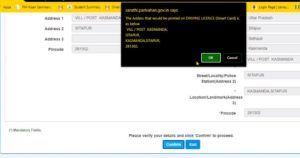
If you get this kind of payment error then you have to click on the HOME button. And have to come home.

After coming home, you have to click on Fee Payment. As soon as you click on Fees Payment.

Then this page will open in front of you. In which you have to enter your application number. And click on Fees Pay.

Now your payment has been verified, now click on Click Here for Print Receipt.

In this page you have to fill the captcha. And click on Print Receipt.

Now you have to print it.

driving licence renewal fees

Now you have to click on APPOITMENTS BOOKING. After clicking, you will get the option of LL / DL SERVICES APPOITMENTS, on which you have to click.

In this page, you have to enter the application number and date of birth and fill the captcha and click on proceed.

Now an otp will have been sent to your mobile number. which you have to fill. And click on SUBMIT.

Now you have to click on proceed sold booking.

Now you have to select a date. And the time has to be selected. And click on Book Slot.

And now click on print. And take it on print.

driving licence

Note: Take a print out of all the forms you have just filled and take a print of the document you uploaded and also take the original document and submit it to your RTO office. Your verification will be done in RTO office. And after a few days your new driving license will be sent to your address.

Friends, if you liked this post of ours, then you should share this post of ours with your friends. Thank you for reading this post Have a nice day.

renewal of driving licence

driving licence को renew कैसे करे- parivahan.gov.in

google input downloand kaise kare

अगर आप भी अपने pc-लैपटॉप में हिंदी भाषा में टाइपिंग करना चाहते है. तो आप इस पोस्ट को पूरा पढ़े. –google input tools

दोस्तों हिंदी में टाइप करने के लिए आपको अपने pc-लैपटॉप में Google का एक software डाउनलोड करना होगा. जिसका नाम google input tools है. यह गूगल का एक फ्री software है. जोकि आपको ऑनलाइन varjan setup में मिलता है. Online setup में आप ऑनलाइन ही हिंदी में टाइप कर सकते है. पर इसे पहले google input tools का ऑफलाइन setup भी मिलता था. जोकि google google input tool की वेबसाइट पर मिल जाता था पर अब जो है. google ने अपने google input tools ऑफलाइन setup को हटा दिया है. जिसके कारन बहुत सरे लोगो को google input tools के ऑफलाइन setup डाउनलोड करने में समस्या आ रही है. तो हम आपको इस पोस्ट मर स्टेप-by-स्टेप आपको बताएँगे की आप कैसे बड़ी आसानी से अपने pc-लैपटॉप में google input tools को डाउनलोड कर सकते है.

google input tools को डाउनलोड करने के लिए आपको सबसे पहले किसी भी browser को ओपन कर लेना है. फिर आपको सर्च करना है. google input tools offline installer जैसे ही आप यह सर्च करेंगे तो आपके सामने http://rajbhasha.net यह वेबसाइट आ जाएगी.

आपको http://rajbhasha.net इस वेबसाइट को ओपन करना है. आप चाहे तो इस लिंक पर क्लिक करके भी इस वेबसाइट पर जा सकते है. हम आपको निचे लिंक दे देंगे जिस पर क्लिक करके आप google input tools को direct download कर सकते है.

direct download : google input tools क्लिक here

जैसे ही आप http://rajbhasha.net इस वेबसाइट को ओपन करेंगे तो आपके सामने यह पेज आएगा. इस पेज में आपको ऊपर ही ऑप्शन मिल जाता है. Google Hindi Input Windows XP, Windows 7 Windows 10 (32 Bit and 64 Bit) आपको जिस Windows के लिए google input tool को डाउनलोड करना चाहते है. आपको उस Windows पर क्लिक कर देना है. जैसे की हम Windows 7 के लिए google input tool डाउनलोड करना है. तो हम Windows 7 पर क्लिक कर देंगे.

अब आप एक नए पेज पर आ जाएंगे इस पेज में आपको निचे आ जाना है. नही आपको दो ऑप्शन मिलेंगे. पहला Windows 64 bit और दूसरा Windows 32 bit जैसे की आप image में देखे सकते है. पहला Google Hindi Input Windows XP, Windows 7 Windows 10 (Choose for 64 Bit) और दूसरा Google Hindi Input Windows XP, Windows 7 Windows 10 (Choose for x86 or 32 Bit) आपको जिस भी Windows और Bit के लिए डाउनलोड करना है. उस पर क्लिक कर देना है.

इसके बाद आप इस पेज पर आ जाएंगे. इस पेज में आपको फिर I’m not a robot पर क्लिक कर देना है.

I’m not a robot पर क्लिक करने के बाद आपको निचे दो ऑप्शन Reset और Submit आपको डाउनलोड करने के लिए आपको Submit बटन पर क्लिक कर देना है.

Submit पर क्लिक करते ही आपका google input tools का setup डाउनलोड होना start हो जायेगा. डाउनलोड होने के बाद आप इसे अपने pc-लैपटॉप में install कर सकते है.

HDFC बैंक में account ओपन कैसे करे – HDFC Bank Open Account

दोस्तों आप इस तरह से अपने pc-लैपटॉप में google input tools का setup डाउनलोड कर सकते है. दोस्तों अगर आपको हमारी  यह जानकारी अच्छी लगी होतो हमारे इस पोस्ट को अपने दोस्तों के साथ शेयर करे. आप सभी का हमारे इस पोस्ट को पढने के लिए धन्यवाद आपका दिन शुभ रहे.

आयुष्मान कार्ड लिस्ट में नाम कैसे जोड़े – Mera.pm.jay.gov.in

नमस्ते दोस्तों आप सभी का हमारे इस post में स्वागत है. आज के इस post में हम सीखेंगे की आप कैसे घर बैठे अपना नाम Ayusman card list में जोड़ सकते है.

Ayusman bhart योजना जो भारत सरकार के द्वारा शुरू किया गया है. इस योजना के अंतर्गत जिन परिवार का नाम जोड़ा जायेगा. उन परिवारों को हर साल 5 लाख तक का बिमा दिया जाता है. Ayusman card से आप किसी भी सरकारी या फिर private हॉस्पिटल में अपना मुफ़्त इलाज करवा सकते है.

eligibility for ayushman bharat yojana

अब बात करते है की अगर आपका नाम इस योजना लिस्ट में नही है तो आप कैसे अपने नाम को इस योजना में जोड़ सकते है. इस योजना में उन लोगो का नाम जोड़ा गया है. जिनका BPL कार्ड/ अन्तोदय कार्ड / पात्र ग्रहस्थी कार्ड, राशन कार्ड बना हुआ है और जिनका इन कार्ड में नाम दिया गया है. और जिन परिवारों का नाम इस योजना में नही आया है. उन परिवारों को वीडयो और लेखपाल के द्वारा चिन्हित किया जायेगा और नए परिवारों को जोड़ा जायेगा.

ayushman bharat registration

अगर आपका नाम इस योजना लिस्ट में है. तो आप अपने नजदीकी स्वाथ्य केन्द्र और csc सेंटर पर बनवा सकते है. ग्रामीण क्षेत्रो में अभी Ayusman card मुफ़्त बनाया जा रहा है. अगर आपके परिवार के किसी सदस्य का नाम इस योजना में आया है. और आपका नाम इस योजना में नही है. और आप अपना Ayusman card बनाना चाहते है. तो आप अपने नजदीकी स्वाथ्य केन्द्र पर जाकर apply कर सकते है. जिसके बाद आपके घर के condition को देख कर आपका नाम जोड़ दिया जायेगा.

ayushman yojana list

आगर आप अपना इस योजना में नाम चेक करना चाहते है. तो आप यह बहुत ही आसानी से कर सकते है. इसके लिए आपको सबसे पहले इस Mera.pm.jay.gov.in वेबसाइट पर आ जाना है.

जब आप इस वेबसाइट पर आयेंगे तो यह page आपको ऐसा दिखेगा. इस वेबसाइट पर आपको बताया गया है. कि आप कैसे अपना नाम इस लिस्ट में चेक कर सकते है. इस वेबसाइट पर आप अपने मोबाइल नंबर से चेक कर सकते है की आपके परिवार में किसी का नाम इस लिस्ट में सामिल है. या नही. लिस्ट में नाम चेक करने के लिए आपको सबसे पहले अपना मोबाइल नंबर डालना है. और Generate OTP पर click कर देना है. और आपके मोबाइल नंबर पर जो otp send किया गया है. उसे डाल कर आपको लॉग इन कर लेना है.

ayushman card mobile se kaise banaye

इतना करते ही आपके सामने यह page आ जायेगा. इस page में आपको सबसे पहले अपना राज्य सेलेक्ट करना है. राज्य सेलेक्ट करने के बाद आपको सेलेक्ट करना है. की आपक किस माध्यम से अपना नाम चेक करना चाहते है. हम यह नाम से चेक करना चाहते है. तो इसके लिए हम Search By Name को सेलेक्ट करेंगे. इसके बाद आपको अपना पूरा पता टाइप कर देना है. और सर्च बटनपर click कर देना है.

इनता करते ही आपके द्वारा डिगे जानकारी के अनुसार आपके सामने आपका नाम आ जायेगा.

ayushman bharat yojana card kaise banega

तो दोस्तों आप इस तरह से अपना नाम Ayusman card लिस्ट में चेक कर सकते है. दोस्तों अगर आपको हमारी यह जानकारी अच्छी अलगी होतो हमारे इस post को अपने दोस्तों के साथ शेयर करे. आप सभी का इस post को पढने के लिए धन्यवाद आपका दिन शुभ रहे.

Apply Online Ayushman Bharat Yojana health Card PMJAY 2020

Mera.pm.jay.gov.in


error:
Exit mobile version